











English


Guide
How to Adjust Auto-Play Settings in Legend of Ymir?




Auto-play is the backbone of daily farming in Legend of Ymir. Get the settings wrong and you can end a whole night with nothing to show for it, or even lose alignment value. The key settings are spread across several menus, and each one has to be configured correctly for the run to be safe and efficient. Grinding mobs, gathering, and running quests can all be handed over to auto mode, and your character will carry out these repeated actions on its own. Most settings are one-time adjustments that stay in effect, so the auto-play keeps running by these rules afterward.
Auto Battle and Auto Gather: Where to Turn Them On
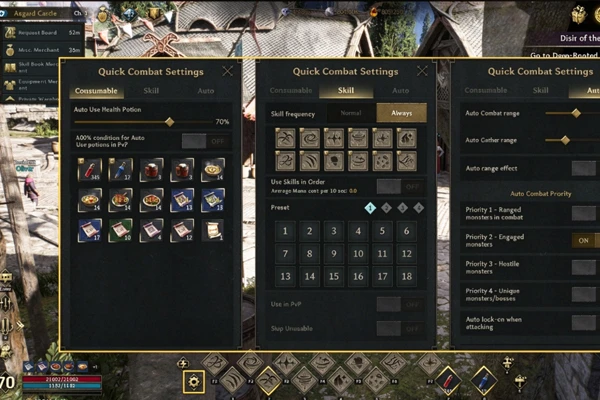
Before auto-play does anything, you have to enable Auto Battle. The toggle is in the function buttons on the interface.
- The function buttons on the main interface switch the character between Auto Battle and Auto Gather.
- The gear icon opens Quick Battle Settings, which has three tabs: Consumables, Skills, and Auto. The Skills tab lets you add or remove skills from the auto rotation.
- Auto Attack and Auto Gather then run automatically within the set range.
The toggles and the three tabs are the foundation of auto-play, so confirm they are all turned on.
Auto-Use Potions
Whether a long auto-play session can hold up comes down to Auto-Use Potions.
- Turn on Auto-Use Potions in the Consumables menu, and the character drinks automatically whenever HP drops below the set threshold.
- The threshold is adjustable. Raise it for high-intensity areas and lower it for easier ones.
- Melee classes get hit constantly, so Berserker and Warlord need this setting more than anyone.
The potion threshold decides how long the run lasts, and a melee class without it is essentially undefended.
Lock the Target Mode to Justice
The easiest thing to overlook during auto-play, and the costliest, is the target mode.
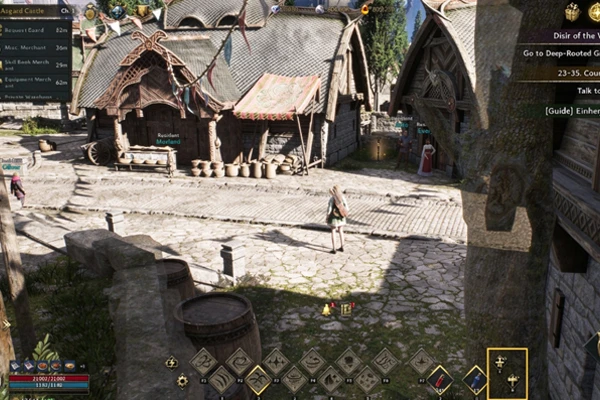
- Under Menu, Battle, and Target settings, the attack target comes in three tiers: Justice, Hostile, and Slaughter.
- Justice attacks only hostile characters. You can strike back when someone hits you first, and a counterattack kill does not cost any alignment value.
- Hostile and Slaughter attack other players, so auto-play in either of these two will easily hit others by accident and drain your alignment value.
Set the target to Justice before you start, and your alignment value stays intact.
Keep Bag Weight Under the Warning Line
Carrying weight is where long auto-play sessions most often go wrong. Once the bag fills up, the penalty eats directly into your staying power.
- When carrying weight is too high, dodge distance shortens and recovery slows down.
- At 80% weight or more, mana recovery is blocked, and mana-recovery consumables stop working.
- Under the game's convenience options, set Auto Pickup to collect only high-grade gear and above, which keeps low-grade gear from piling up in your bag.
Dismantle or sell Rusty-tier gear on a regular schedule, and pair that with a Companion to raise the bag's maximum weight, so the weight stays under the warning line.
Where to Run Long Auto-Play Sessions
Long sessions need the right spot. Safe Zones turn off player-versus-player combat, so there is no risk of being attacked; rewards are slightly lower than contested areas, which makes them ideal for an overnight run. You cannot kill monsters while fully offline, so auto-play has to stay online, and power-saving mode cuts down on battery drain. Some main-quest fights, hidden chests, gathering nodes, and viewpoints can only be handled manually, and none of these fall within what auto-play produces.
Auto-play comes down to four settings: the Auto Battle toggle, the Auto-Use Potions threshold, the Justice target mode, and the bag-weight warning line. Get these four right and run long sessions in a Safe Zone, and the output becomes steady. Check back on potion usage and your position during the run so the character doesn't end up idling in place. Match the area to your online hours and combat power, and the auto-play returns will keep pace with your character's growth.


