











English


Gameplay
Which Skills Should You Use When Auto-Fighting in MIR4?




In MIR4, the key to auto-fighting isn't stuffing all the powerful skills into your hotbar, but rather prioritizing skills that are "suitable for automatic use." The official instructions are straightforward: with auto-battle enabled, your character will automatically attack nearby enemies and use skills and potions from your hotbar. The system also recommends using only skills that your character should use automatically during auto-battle, leaving skills that require manual timing separate.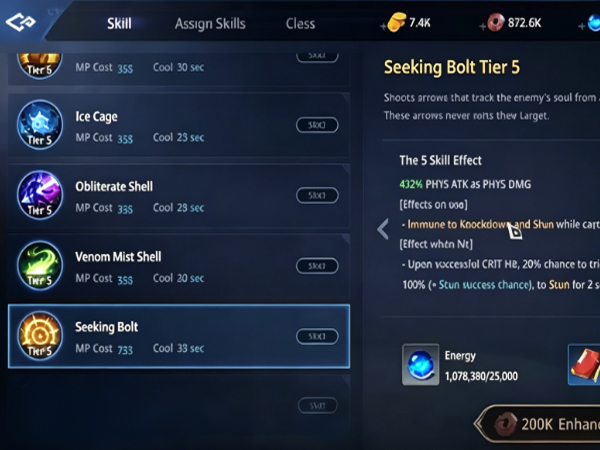
What skills should you bring when farming monsters in an auto-play mode?
The best skills for auto-battle are generally those with fast cast times, wide ranges, and short cooldowns. Because auto-battle doesn't require the precise timing of manual combat, it's better suited for skills that "reliably hit monsters with a single press." The official combat instructions mention that auto-battle uses hotbar skills, and it's recommended to use combos as needed during combat; if a skill has a Debilitation effect, following it with skills that cause Bash and DMG Boost often results in higher damage. This approach also applies to AFK (away from keyboard) gameplay, but you should prioritize placing these combos in slots that can be automatically triggered.
From a practical standpoint, the skills most worth keeping while AFK are usually area-of-effect attacks, damage over time, slowing/controlling abilities, and skills that provide some survivability. This is because when grinding, your biggest fear isn't insufficient single-hit damage, but rather missing skills, being too slow to kill monsters, or standing still and taking damage for too long. The official game settings also provide options for auto-battle range, auto-aiming, and skill frequency, indicating that AFK efficiency depends not only on the skills themselves but also on whether you've properly adjusted the auto-battle parameters.
What skills should you bring when farming monsters in an auto-play mode?
l Prioritize Area-of-Effect Skills
These skills can hit multiple targets at once, making them suitable for areas with many monsters. Auto-battle will automatically use skills from the hotbar, so the more stable the range, the easier it is to grind monsters.
l Prioritize Skills with Low Error Rates
Skills with fast casting speed, stable hit detection, and short wind-up are more suitable for AFK because auto-battle won't fine-tune your positioning.
l Prioritize skills with control or debuff effects
The official documentation explicitly states that following Debilitation with Bash/DMG Boost deals extra damage, making this skill chain ideal for auto-play.
l Prioritize survival skills
Skills like movement, slowing, damage reduction, and healing are especially useful in areas with high monster damage. The official documentation also mentions using Roll for damage reduction against powerful attacks, indicating that survival skills are equally important in auto-battle.
l Reserve manual burst skills
The official recommendation is to remove manual skills as needed and manually execute combo skills. This means that burst skills requiring precise timing may not be suitable for constantly being placed in the auto-play bar. To summarize simply: for auto-play, use skills that reliably hit monsters and minimize skills that require precise timing.
Automatically apply skills when the character is idle
When manually fighting monsters, you can choose monsters, wait for skill windows, and execute combos yourself. Therefore, high-burst skills, long-cast animation skills, and skills requiring casting time often perform well. However, auto-battle is different. Auto-battle prioritizes "automation efficiency," which is why the official recommendation is to only put skills that the character should use automatically in the shortcut bar. Looking at it more closely, manual mode is better suited to "I decide when to use skills," while auto-battle is better suited to "the system can reliably use skills automatically." The official combat guide also mentions that you can adjust skill frequency, auto-battle range, auto-aiming, and target selection during combat. These settings directly affect skill hit rate and monster-pulling rhythm during auto-battle. In other words, auto-battle isn't simply about choosing skills, but about combining "skills + settings." Therefore, in manual mode, you can pursue maximum damage; in auto-battle, you should aim for stable output. Many people have low auto-battle efficiency not because of insufficient combat power, but because they put too many manually-oriented skills in the auto-battle bar, resulting in idle skills, chaotic target switching, and a disrupted monster-killing rhythm.
Frequently Asked Questions
Q: Is it okay to put all the strongest skills in the shortcut bar when auto-battled?
No. The official recommendation is to only put automatically used skills in auto-battle, and keep manual skills as needed. The strongest doesn't necessarily mean the most suitable for auto-battle.
Q: Is it necessary to bring control skills? Yes, especially for skills with Debilitation. The official documentation explicitly states that applying Debilitation first, followed by Bash/DMG Boost skills, will result in more damage.
Q: Should I turn on auto-aim while AFK?
You can turn it on depending on the situation. The official combat settings provide an Auto-aim When Attacking option, which prevents frequent target switching during attacks. This is generally more stable when farming monsters.
Q: Is it better to use more skills?
No. Auto-combat uses the hotbar skills, but if you cram in too many unreliable skills, it will actually slow down efficiency. The official approach is to "only keep the ones that should be used automatically."
Q: How do I adjust the combat range?
The official settings provide an Auto-combat Range option, indicating that the range can be adjusted when AFK farming monsters. Generally, you can be more aggressive when monsters are densely packed, and more stable when monsters are scattered.
A strategy guide for auto-playing games suitable for most professions
Let's assume you're a player who works during the day and AFK farm monsters at home in the evening. Your goal isn't to unleash the most flashy combos, but to ensure your character consistently clears mobs in auto-battle. To achieve this, you can organize your skill bar like this: first, place a wide-area, fast-cast main damage skill; then, place a skill with a debuff or control effect; and finally, add a second-stage area-of-effect damage skill. This way, auto-battle can first apply buffs, then follow up with higher damage output. In the official example, the Elementalist uses Frost Orb to inflict Chill, then follows up with Thunderstorm for Bash and DMG Boost; while this is a single-class example, it illustrates a general auto-battle strategy: apply buffs first, then deal damage.
If your class has healing, shield, or damage reduction skills, you can also keep one in the auto-battle bar, especially when the monsters in your auto-battle area are tough and have high attack power. The official documentation also mentions using Roll for damage reduction against powerful skills, so survival skills and damage skills aren't mutually exclusive; it's best to balance both when auto-battle. You can also go into the system settings and adjust parameters like skill frequency, auto-combat range, and auto-aiming together. This is more effective than simply changing skills. Prioritizing skills that focus on "area damage, crowd control debuffs, and survivability" will generally result in significantly higher AFK efficiency than randomly cramming skills.
When AFK farming in 《MIR4》, the most suitable skills aren't the most flashy, but the most stable. Auto-combat will automatically use skills and potions in the hotbar; it's also recommended to only put skills that your character should use automatically in auto-combat, while keeping skills that require manual timing out. Combined with the skill combo strategy of "Debilitation followed by Bash/DMG Boost," you can see the core direction for AFK skills: stability first, speed second, and higher damage last.
If you want to increase AFK efficiency, the simplest approach is to remember three things: First, prioritize skills with large range, short cast times, and reliable hits. Second, keep one skill that weakens enemies or provides survivability. Third, remove burst skills that truly require manual control from the auto-bar. The official documentation also provides settings for auto-battle range, auto-aiming, and skill frequency, indicating that skill configuration and system settings must be considered together, not just focusing on the skill bar. Therefore, the best skill combination for AFK farming is not "all the strongest," but "all the most stable." When your skill bar is better suited for auto-triggering, with fewer target switches and a more natural combo sequence, your character will use fewer potions, waste less time during long periods of AFK farming, and clear monsters faster. For most classes, this is the most practical AFK farming strategy.


