











العربية


Guide
How to Claim FREE AION 2 Twitch Drops?




AION 2 enters Early Access on September 30, 2026, ahead of its full global launch on October 5. To mark the launch and the opening of the global servers, NC America is running the War for Atreia creator event, which includes a Twitch Drops campaign. You earn in-game rewards based on accumulated watch time while viewing the designated channels. The campaign involves account linking, watch-progress tracking, and reward claiming. Before taking part, connect your Twitch account to your AION 2 account and watch the designated channels so your watch time is counted toward the drops.
About the War for Atreia Event
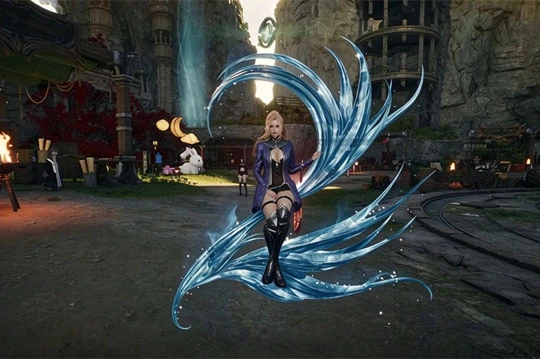
War for Atreia is a limited-time creator event running alongside the AION 2 launch, built around the two factions of Elyos and Asmodian. Sixty creators from North America, Europe, and Latin America form six teams, each representing one of the two factions. The rosters were finalized in a public stream on September 23, and the event runs from the start of Early Access through the official launch period.
Twitch Drops are the viewing rewards within War for Atreia. Once you watch a participating channel and reach the required watch time, you unlock the corresponding reward. Rewards open in stages across the event, so you need to keep watching and complete the claim on the Twitch Drops page. No additional purchase is required; linking your accounts and watching the designated streams is all it takes to participate.
|
Item |
Detail |
|
Early Access |
September 30, 2026 |
|
Global launch |
October 5, 2026 |
|
Event |
War for Atreia |
|
Duration |
Two-week limited-time event |
|
Creators |
60, across North America, Europe, and Latin America |
|
Factions |
Elyos vs. Asmodian |
|
Teams |
Six |
|
Watch platform |
Twitch participating channels |
|
Rewards |
Twitch Drops (staged), hidden bounty rewards, viewer participation rewards |
Rewards in War for Atreia
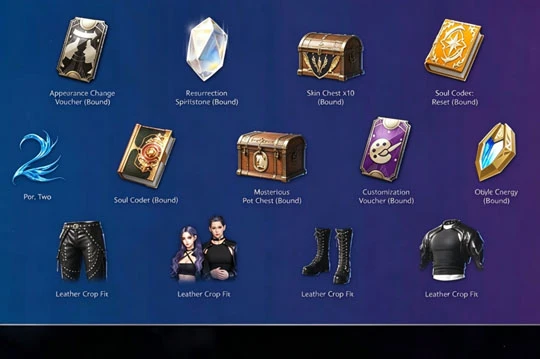
War for Atreia offers several kinds of rewards, and each has its own way of being claimed. Twitch Drops are the main reward type earned by watching streams. After you reach the required watch time on a designated channel, you claim the reward on the Twitch Drops inventory page, and it is then sent to your linked AION 2 account. The event also includes hidden bounties and viewer participation rewards. The participation rewards are tied to the Elyos versus Asmodian faction race and the Top Legion activities, and they are not distributed through the Twitch Drops inventory. For this reason, check which claim method applies to each reward so nothing is left unclaimed.
Link Your Accounts Before Participating
Twitch Drops can be delivered to your game account only after the accounts are linked. Before participating, have a valid Twitch account and an AION 2 account accessed through PURPLE or Steam, and confirm that your region falls within the event's coverage. Then open the official AION 2 campaign page, sign in to Twitch and to the NC account used to log into the game, and complete the connection. Link the accounts before you start watching, because watch time is counted toward Twitch Drops progress only after the link is in place.
How to Claim AION 2 Twitch Drops
After linking your accounts, you can earn rewards by watching the event streams. Each Twitch Drops reward requires its own watch time and must be claimed separately.
Watch a Designated Stream
Open an AION 2 stream that is participating in War for Atreia. Channels with Twitch Drops enabled usually show a Drops Enabled tag, and watching a qualifying channel adds to your reward progress. You can switch between participating channels while watching, but only one channel's watch time counts at any given moment.
Accumulate Watch Time to Unlock Rewards
Each Twitch Drops stage has its own watch-time requirement. Once you reach the required time, you unlock that stage's reward. The time does not need to be continuous; reaching the total is enough.
Claim Rewards from the Twitch Drops Inventory
When a reward meets its claim requirement, Twitch shows a claim prompt. Open the Twitch Drops inventory page, confirm the completed reward, and claim it manually. A reward that has not been claimed does not enter your game account on its own.
Confirm the Reward Delivery
After you complete the claim on Twitch, the reward is sent to your linked AION 2 account. Account data takes some time to sync, so some rewards may not appear immediately. You can log back into the game later to confirm delivery.
How to Check Your Twitch Drops Progress
Open the Drops inventory page from your Twitch profile menu to see the campaigns you are in, your reward unlock progress, and the items available to claim. While watching, check this page regularly to confirm that watch time is accumulating and to claim completed rewards without delay. Note that running several streams at once does not speed up your progress; at any given moment, only one channel's watch time counts toward the Twitch Drops campaign.
What to Do If a Reward Does Not Arrive
After you claim a reward, it is normally sent to your linked game account and shown in the in-game mail or account inventory.
If a reward does not arrive in time, check the following:
- Confirm that the Twitch account and the AION 2 account are the same linked pair.
- Check that your server region meets the event requirements.
- Confirm that the reward status shows Claimed rather than remaining in the pending state.
If your watch time is not accumulating, confirm that the stream you are watching belongs to the event and that it is actively playing rather than paused, so progress is not lost to a paused stream or a broken account link.
The War for Atreia Twitch Drops give AION 2 players a way to earn in-game rewards during the launch period. Link your Twitch and game accounts ahead of time, watch the designated channels, and claim each reward as its stage opens. That completes the whole flow. New Twitch Drops continue to open as the event advances, so follow the official AION 2 Twitch channel and the campaign page to keep track of the current stage, the watch requirements, and the rewards, so you can claim everything available.


